Mode 0
State diagram
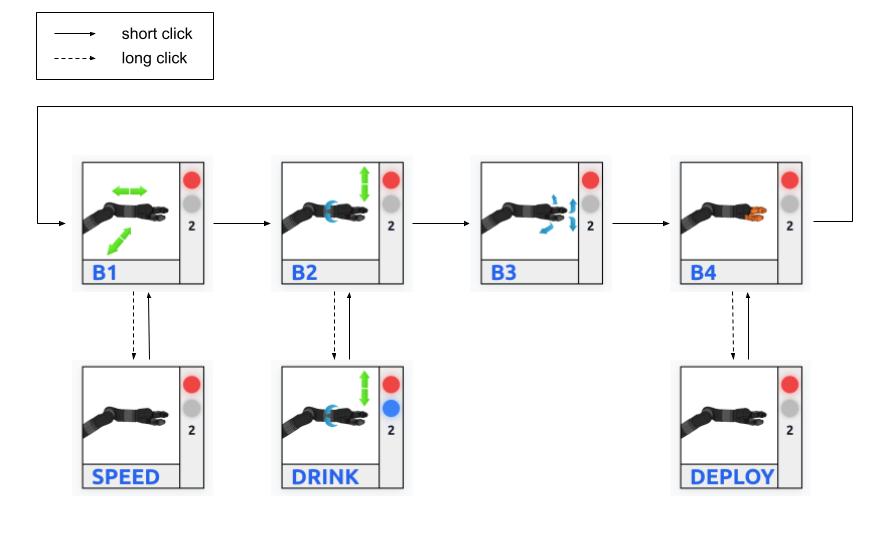
When the robot starts in Mode 0, it is in the retracted state (red indicator). To move the robot, you must first deploy it by switching to DEPLOY mode and pushing the joystick up. Once the robot is fully deployed, it switches to the ready state (green indicator), and movements in the other modes are enabled.
Mode description
- B1 :
Left/Rigth : Move the robot from left and right in the world frame
Up/Down : Move the robot forward and backward in the world frame
- SPEED :
Up/Down : Increase/Decrease the speed of the robot
- B2 :
Left/Right :Rotate the robot around the roll axis in the gripper frame
Up/Down : Move the robot up and down in the world frame
- DRINK :
Left/Right : Rotate the robot around the roll axis and move the robot up and down to help with drinking motion
Up/Down : Move the robot up and down in the world frame
- B3 :
Left/Right : Rotate the robot around the yaw axis in the gripper frame
Up/Down : Rotate the robot around the pitch axis in the gripper frame
- B4 :
Up/Down : Open/Close the gripper
- DEPLOY :
Up/Down : Deploy/Retract the robot arm
Status description
- Top indicator :
 Red : Robot is consider retracted; movements in other modes are locked
 Orange : Deployement or retraction in progress
 Green : Robot is ready; movements are allowed
- Bottom indicator
 Blue : Robot is in drink mode
- Speed level indicator :
 : Current speed level of the robot (1 to 9)